See how crowded a job is before you click.
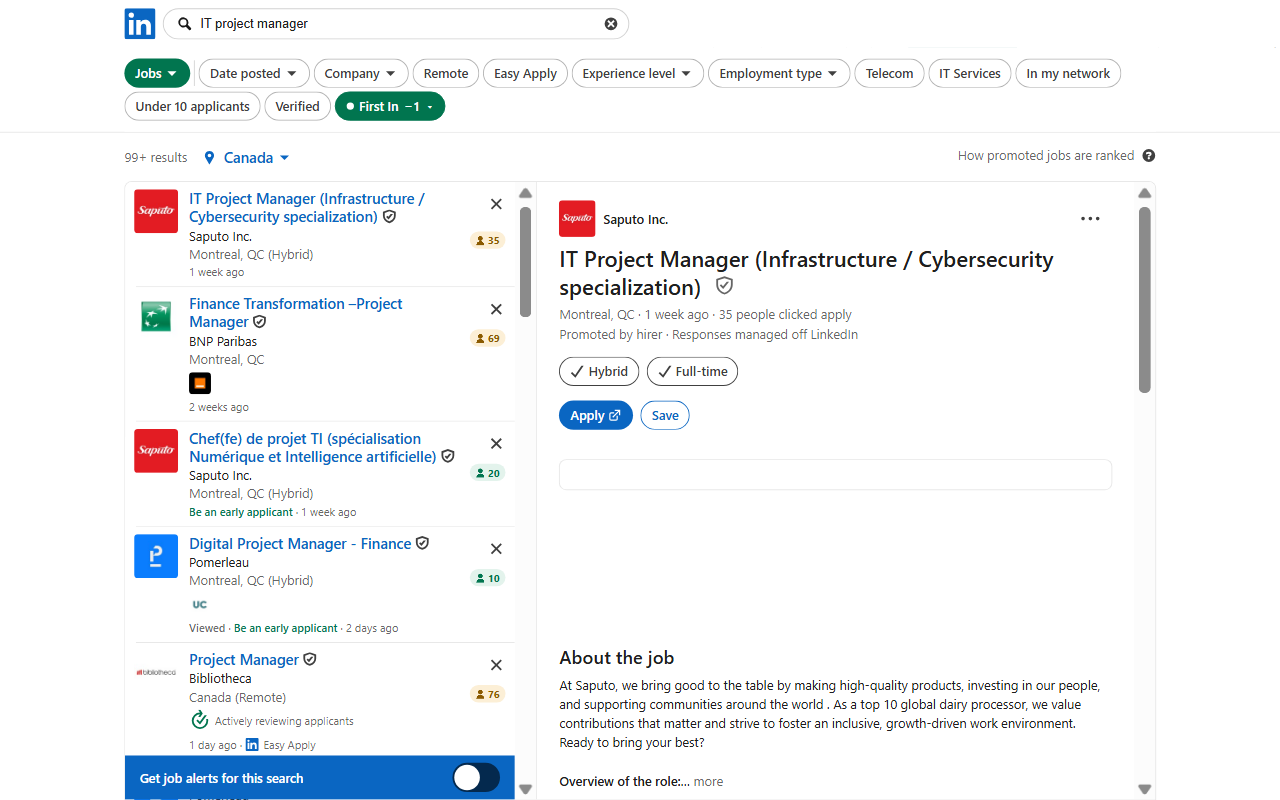
First In is a Chrome extension that puts the applicant count on every job in LinkedIn search, and hides the ones you do not want to see.
What it does
- Applicant count on every job card: green under 25, amber 25 to 100, red over 100.
- Hide every job over the limit you choose.
- Hide jobs you already applied to or viewed, promoted and reposted jobs, Easy Apply jobs, and jobs with or without a salary.
- Promoted and reposted jobs are marked as LinkedIn reveals them.
- Every filter shows how many jobs on the page it concerns.
What it does not do
- It never applies, saves, dismisses or messages. It only reads the page you are looking at.
- It sends nothing to us. Your counts and settings stay in your browser.
What it costs
The applicant count on every job is free, for as long as you use it. The filters are free for 7 days, with nothing to sign up for. After that a single payment unlocks them for good: $4.99 at the launch price. No subscription.
Good to know
The count is the one LinkedIn records: people who applied, or clicked Apply, through LinkedIn. Applications sent straight to a company's site are not in it.
Works with LinkedIn set to English, French, Spanish or German. LinkedIn limits how fast job pages can be read; First In stays under that limit, so on a busy page a few counts can take a moment to appear.